




- Stock: En stock
- Model: 001-0432

Corel Digital Studio 2010 (PC CD)
Product Details:
Introducing Corel® Digital Studio™ 2010
For the first time on the PC, Corel® Digital Studio™ 2010 brings together photo, video, DVD burning and playback within a single, consistent user interface that makes it simple for anyone to get amazing results. With this digital media suite, it is now possible for anyone to organize all of their digital media in one place, effortlessly enhance photos, and turn their video clips into movies in just minutes. Leaving complicated jargon and processes behind, Corel Digital Studio 2010 simplifies working with photos and videos on the PC. Optimized to take full advantage of all of the time-saving features and ease of use of Windows® 7, Corel Digital Studio 2010 is the easiest photo, video and DVD-burning software you’ll ever use.
|
 | Suite-wide features in Corel® Digital Studio™ 2010Capturing and enhancing life’s memoriesWindows® 7 compatibility: Designed to make everyday tasks faster and easier, Windows 7 promises to change the way PC users work. Corel Digital Studio 2010 is built to take advantage of all that this new operating system offers, with full Windows 7 optimization. Key Windows 7 features in Corel Digital Studio 2010 includes support for Jump Lists, providing fast and easy access to recently used features, tools, and content.Windows Touch: With Windows Touch, Corel Digital Studio 2010 lets anyone with a touch-screen PC literally get hands-on with their videos, photos, and creative projects. Intuitive user interface: The applications in Corel Digital Studio 2010 have similar workspaces and workflows, so concepts learned in one program are easily transferred to another. Media Organizer: The hub of the suite is the Media Organizer, where users can quickly search for and access all of their media files from one location. The Media Organizer automatically filters media content, giving prominence to files that are most relevant to the active application. Hassle-free media import: Corel Digital Studio 2010 takes the guesswork out of importing media files from a range of devices, including digital cameras, camcorders, memory cards, and mobile phones. | |
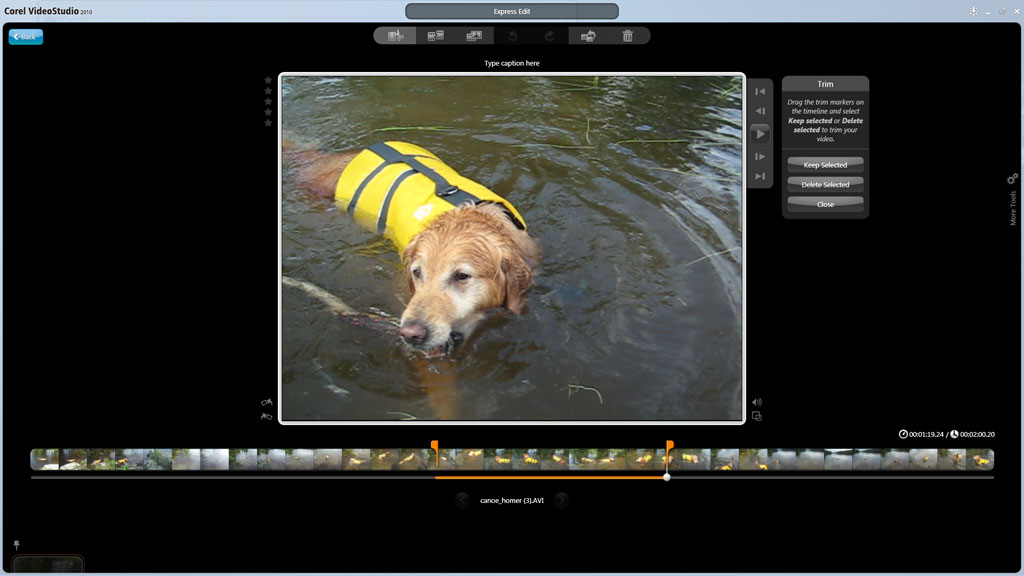
 | Corel® VideoStudio® Express 2010 key featuresCapturing and enhancing life’s memories Easy video import: VideoStudio Express 2010 automatically detects cameras, camcorders, and memory cards, and imports video clips to folders in the Media Organizer. Media clips can be further organized into custom albums, making them easy to find and use in creative projects. Intuitive video organization: The Media Organizer makes video previewing and organizing a breeze. Home videographers can easily access their video clips by viewing thumbnails, searching by tag, caption, name, folder or album, as well as sorting them by name, date, or rating. By simply right-clicking on a video clip, users can choose to e-mail it, upload it to YouTube, or view it in WinDVD 2010. Express Edit: VideoStudio Express 2010 makes basic video editing a snap — even for novices. Double-clicking a video clip at anytime launches the Express Edit mode, where videos can be quickly improved and unwanted clips can be deleted. | |
 | Corel® WinDVD® 2010 key featuresReliving life’s memoriesInstant preview: As much as reviewing video on a tiny camcorder or digital camera screen serves a purpose, it really doesn’t do the clip justice. WinDVD 2010 gives users a much clearer picture of what they’ve captured. Without having to transfer anything to their computer, they can preview video on their PC directly from a storage device, camera, or camcorder. High-quality playback: WinDVD 2010 offers full-resolution playback quality — with Dolby Digital audio up to 5.1 channels and for video formats in standard and high definition, including MPEG2 and AVCHD — that brings the movie theatre experience to the PC. Playback from mobile devices: Users can play back videos stored on mobile devices, such as an iPod, PlayStation Portable, or mobile phone. Video format compatibility: WinDVD 2010 plays the most common video formats, including DVD-Video, QuickTime, Windows Media, M2T, and M2TS support. Personalized bookmarks: When watching a DVD, stopping playback and struggling to locate the last-viewed scene can be very frustrating. WinDVD 2010 solves this problem by enabling viewers to mark any point on a DVD so they can easily pick up where they left off or find a favorite scene. | |
System requirementsIntel® Core™ Duo T2400 1.83 GHz, or AMD Athlon™ 64 X2 3800+ (2.0 GHz or higher recommended) Input/Output device support1394 FireWire® cards for use with DV/D8/HDV camcorders Input format supportVideo: AVI, MPEG-1, MPEG-2, HDV, AVCHD™, M2T, MPEG-4, H.264, QuickTime®, Windows Media® Format, MOD (JVC MOD File Format), M2TS, TOD, BDMV, 3GPP, and 3GPP2 | ||